Search This Blog

Friday, April 20, 2012

Mount Windows folder on Linux

Sometimes, we need to mount a Windows folder on Linux. In order to do it, let’s follow these steps:
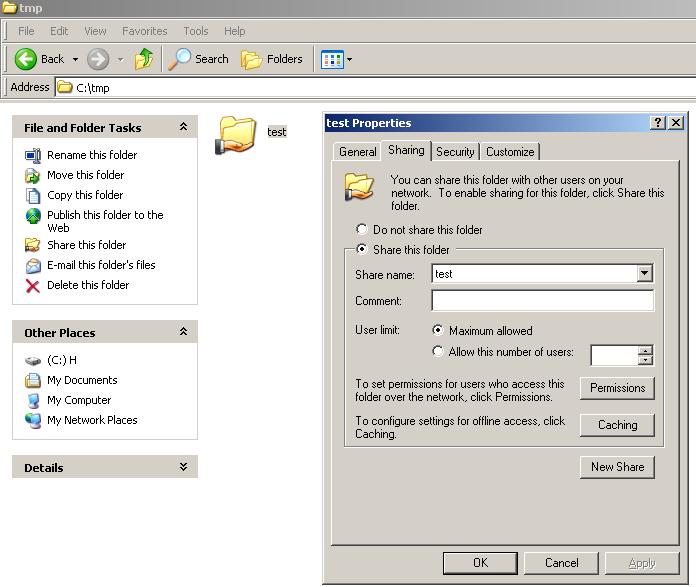
1. Create a directory in Windows, share it and give full permission:
mount_1
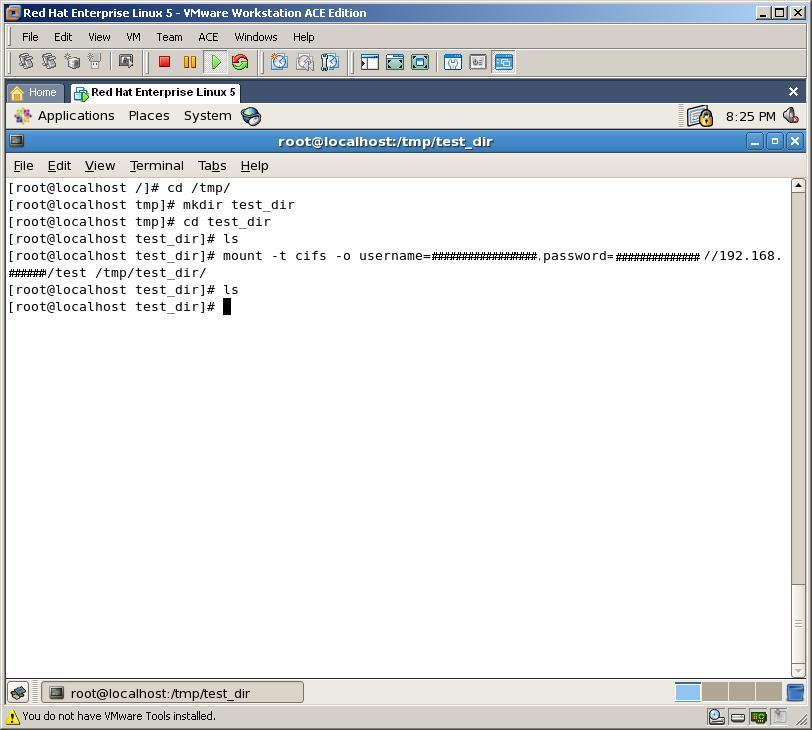
2. Create new directory in /tmp directory on Linux, name it to “test_dir” and mount shared Windows directory into that directory by running below code:
mount -t cifs -o username=#####,password=###### //192.168.##.##/test   /tmp/test_dir
mount_23
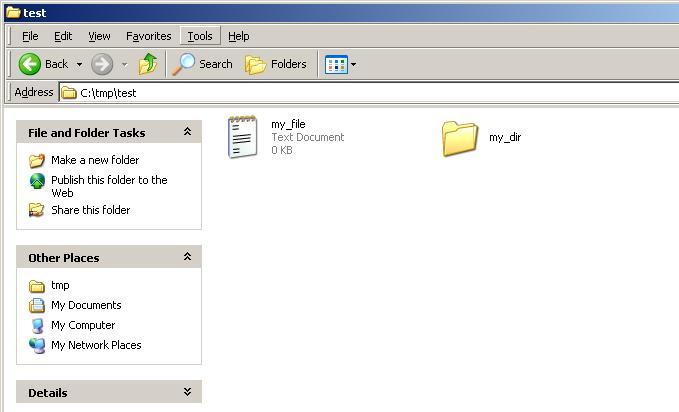
3. Now, by creating new file and folder in Windows directory, we can get them from Linux box. Let’s create a file and a directory in Windows folder
mount_3
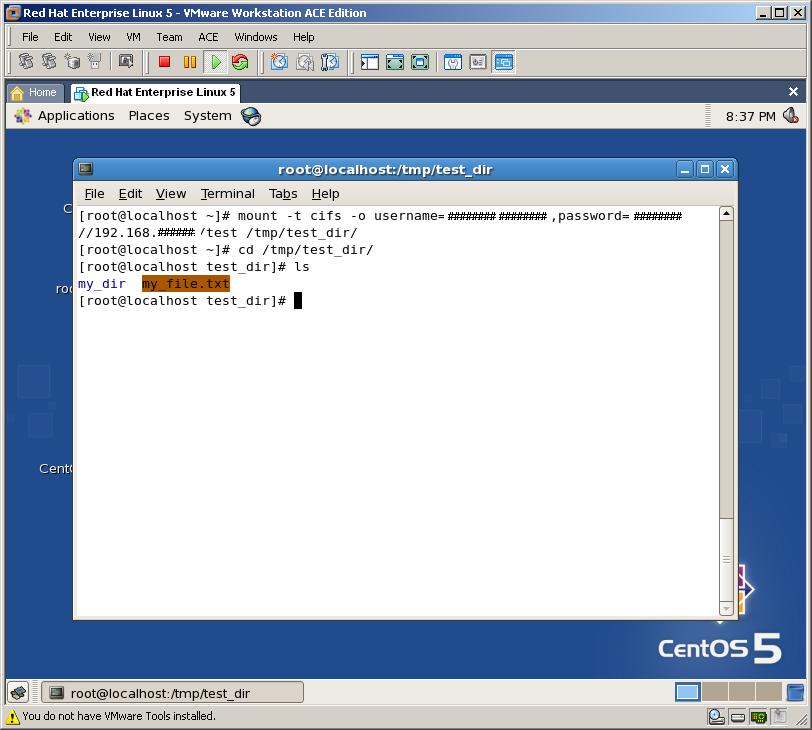
4. At last, let’s check it from Linux, whether we can see the file and the directory or not
mount_4
As you can see, we can mount any Windows folder in Linux with very easy steps

Thursday, March 22, 2012

ORA-24005: must use DBMS_AQADM.DROP_QUEUE_TABLE to drop queue tables

ORA-24005: must use DBMS_AQADM.DROP_QUEUE_TABLE to drop queue tables .
Scenario
I was getting this error when I was trying to drop a schema.
Sql> drop user test cascade;
ERROR at line 1:
ORA-00604: error occurred at recursive SQL level 1
ORA-24005: must use DBMS_AQADM.DROP_QUEUE_TABLE to drop queue tables
Logged in as Test user and checked for queue tables .
SQL> select * from user_queue_tables;
no rows selected

SQL> select OWNER, NAME, QUEUE_TABLE, ENQUEUE_ENABLED, DEQUEUE_ENABLED
from DBA_QUEUES where OWNER='TEST';
 no rows selected
However I was able to locate few queue tables in the schema when I used 
Sql> select table_name from user_tables;
Got few Tables starting with AQ$_ *******
Tried to delete these tables using the DBMS_AQADM.DROP_QUEUE_TABLE procedure . However ended with the following error message .
SQL> begin
  2  DBMS_AQADM.DROP_QUEUE_TABLE(‘AQ$_test');
  3  end;
  4
  5  /
begin
*
ERROR at line 1:
ORA-24002: QUEUE_TABLE SCOTT.AQ$_test does not exist
ORA-06512: at "SYS.DBMS_AQADM_SYS", line 4084
ORA-06512: at "SYS.DBMS_AQADM", line 197
ORA-06512: at line 2

Working solution :
Logged in as sys and issued the following command :
alter session set events '10851 trace name context forever, level 2';
and then dropped all the AQ$.*****  tables from sys successfully.
Finally dropped the particular schema .
Issue resolved 

Friday, March 16, 2012

Linux shell script date formatting

Linux date FAQ: How do I create a formatted date in Linux? (Most likely, "How do I create a formatted date I can use in a Linux shell script?")
I just ran into a case where I needed to create a formatted date in a Linux shell script, where the date format looks like this:
2010-07-11
To create this formatted date string, I just used the Linux date command, using the "+" sign to specify that I want to use the date formatting option, like this:
thedate=`date +"%Y-%m-%d"`
The Linux date command shown in this line of code creates the date string in the format I want, and then I save the date output to a Linux shell script variable named "thedate".
This just shows one possible way to format a date in a Linux shell script. Of course you can use '-', '.', and many other characters as date field separators, or use no characters at all.

More Linux date formatting information

For more information on other Linux date formatting options (there are many more date formatting options), take a look at the man page for the date command on your Linux system, like this:
man date
When I run that command on a CentOS Linux system, it shows these date formatting operators:
%%     a literal %
%a     locale’s abbreviated weekday name (e.g., Sun)
%A     locale’s full weekday name (e.g., Sunday)
%b     locale’s abbreviated month name (e.g., Jan)
%B     locale’s full month name (e.g., January)
%c     locale’s date and time (e.g., Thu Mar  3 23:05:25 2005)
%C     century; like %Y, except omit last two digits (e.g., 21)
%d     day of month (e.g, 01)
%D     date; same as %m/%d/%y
%e     day of month, space padded; same as %_d
%F     full date; same as %Y-%m-%d
%g     last two digits of year of ISO week number (see %G)
%G     year of ISO week number (see %V); normally useful only with %V
%h     same as %b
%H     hour (00..23)
%I     hour (01..12)
%j     day of year (001..366)
%k     hour ( 0..23)
%l     hour ( 1..12)
%m     month (01..12)
%M     minute (00..59)
%n     a newline
%N     nanoseconds (000000000..999999999)
%p     locale’s equivalent of either AM or PM; blank if not known
%P     like %p, but lower case
%r     locale’s 12-hour clock time (e.g., 11:11:04 PM)
%R     24-hour hour and minute; same as %H:%M
%s     seconds since 1970-01-01 00:00:00 UTC
%S     second (00..60)
%t     a tab
%T     time; same as %H:%M:%S
%u     day of week (1..7); 1 is Monday
%U     week number of year, with Sunday as first day of week (00..53)
%V     ISO week number, with Monday as first day of week (01..53)
%w     day of week (0..6); 0 is Sunday
%W     week number of year, with Monday as first day of week (00..53)
%x     locale’s date representation (e.g., 12/31/99)
%X     locale’s time representation (e.g., 23:13:48)
%y     last two digits of year (00..99)
%Y     year
%z     +hhmm numeric timezone (e.g., -0400)
%:z    +hh:mm numeric timezone (e.g., -04:00)
%::z   +hh:mm:ss numeric time zone (e.g., -04:00:00)
%:::z  numeric time zone with : to necessary precision (e.g., -04, +05:30)
%Z     alphabetic time zone abbreviation (e.g., EDT)

Because Unix and Linux systems are very consistent in this area, you  should be able to write a date formatting command on one Unix or Linux  system, and use that same command on another Unix system.

Monday, February 27, 2012

Script to Check Physical Standby in Sync with the Primary

http://shrikantrao.wordpress.com/2011/08/03/script-to-check-physical-standby-in-sync-with-the-primary/
https://support.oracle.com/CSP/main/article?cmd=show&type=NOT&doctype=HOWTO&id=861595.1

A simple script, on single click will provide us the status of DR sync with primary database.

Script 1) .bat file

sqlplus "sys/sys@prod as sysdba" @E:\DRSTATUS\onproduction.sql
sqlplus "sys/sys@standby as sysdba" @E:\DRSTATUS\onstandby.sql >> E:\cloverdba1_Clover_report\DRSTATUS\drsysn.out

I am appending the second output (for standby) to the same file. So that the output for both will be displayed in a single .out file.

Script 2) onproduction.sql file (On Primary)

set time on
set lines 200

spool E:\DRSTATUS\drsysn.out

prompt +++++++++++LAST PRODUCTION SEQUENCE GENERATED++++++++++++++++++

select to_char(sysdate,'dd-mon-yyyy hh24:mi:ss') Date from dual;
SELECT distinct SEQUENCE# "Last Sequence Generated", THREAD# "Thread"
FROM V$ARCHIVED_LOG
WHERE (THREAD#,FIRST_TIME ) IN (SELECT THREAD#,MAX(FIRST_TIME) FROM V$ARCHIVED_LOG GROUP BY THREAD#)
ORDER BY 1;

spool off
exit

Script 3) onstandby.sql file (On Physical Standby)

set time on
set lines 200

prompt ++++++++++++++++++++LAST SEQUENCE RECIEVED FROM PRODUCTION and APPLIED ON STANDBY+++++++++++++++++++++++++

SELECT ARCH.THREAD# "Thread", ARCH.SEQUENCE# "Last Sequence Received", APPL.SEQUENCE# "Last Sequence Applied", (ARCH.SEQUENCE# - APPL.SEQUENCE#) "Difference"
FROM
(SELECT THREAD# ,SEQUENCE# FROM V$ARCHIVED_LOG WHERE (THREAD#,FIRST_TIME ) IN (SELECT THREAD#,MAX(FIRST_TIME) FROM V$ARCHIVED_LOG GROUP BY THREAD#)) ARCH,
(SELECT THREAD# ,SEQUENCE# FROM V$LOG_HISTORY WHERE (THREAD#,FIRST_TIME ) IN (SELECT THREAD#,MAX(FIRST_TIME) FROM V$LOG_HISTORY GROUP BY THREAD#)) APPL
WHERE
ARCH.THREAD# = APPL.THREAD#
;

prompt ++++++++++++++++++++CHECK FOR GAP AT STANDBY+++++++++++++++++++++++++

SELECT THREAD#, LOW_SEQUENCE#, HIGH_SEQUENCE# FROM V$ARCHIVE_GAP;
exit

Explanation:

1. To check availability of redo on standby. This can be done, by checking the output of “last Sequence Generated” in script 2(at primary) with “Last Sequence Received” in script 3(at standby). If the value differs that shows the archive is missing on standby.
2. To Check for redo applied on standby. The column “difference” in script 3(at standby) should be 0. This specifies that the primary is in sync with physical standby.
3. Second query of 3rd script will provide detail on archive gap, which redo is still missing at standby.

To demo the archive lag, I have cancelled managed recovery. This will show the number of lag in “difference” column (7 in my case). The Output file will be displayed as,

+++++++++++LAST PRODUCTION SEQUENCE GENERATED++++++++++++++++++

TO_CHAR(SYSDATE,'DD-MON-YYYYH
---------------------------------------------------------------------------
02-aug-2011 19:03:58

Elapsed: 00:00:00.00

Last Sequence Generated Thread
----------------------- ----------
582535 1

Elapsed: 00:00:00.09

SQL*Plus: Release 9.2.0.1.0 - Production on Tue Aug 2 19:08:05 2011

Copyright (c) 1982, 2002, Oracle Corporation. All rights reserved.

Connected to:
Oracle9i Enterprise Edition Release 9.2.0.8.0 - 64bit Production
With the Partitioning, OLAP and Oracle Data Mining options
JServer Release 9.2.0.8.0 - Production

++++++++++++++++++++LAST SEQUENCE RECEIVED FROM PRODUCTION and APPLIED ON STANDBY+++++++++++++++++++++++++

Thread Last Sequence Received Last Sequence Applied Difference
---------- ---------------------- --------------------- ----------
1 582535 582528 7

Elapsed: 00:00:02.01
++++++++++++++++++++CHECK FOR GAP AT STANDBY+++++++++++++++++++++++++

no rows selected

Elapsed: 00:00:34.06
Disconnected from Oracle9i Enterprise Edition Release 9.2.0.8.0 - 64bit Production
With the Partitioning, OLAP and Oracle Data Mining options
JServer Release 9.2.0.8.0 - Production

Ref: How To Check Whether Physical Standby is in Sync with the Primary? [ID 861595.1]

I found out a nice shell script while googling, would like to share,

#
# Script to check if standby database is in sync and in read only with apply mode
#
# Purpose script:
# This script checks if standby and primary are in sync and if standby is in mode "READ ONLY WITH APPLY"
# violations will be mailed to recepients defined in this script.
#
# Usage script:
# Place this script on the standby database server in /home/oracle/scripts
# The following changes will be necessary when implementing this script
# 1: CONNECTRSTR refers to the connectstring to connect to the primary db from the standby db
# 2: ORACLE_SID referts to the oracle SID of the standby database
# 3: ORACLE_HOME refers to the oracle HOME of the standby database
#

#!/usr/bin/ksh
. /etc/profile

DBSID=PROD # Database sid
CONNECTSTR=scott/tiger@PROD # Connect string prod
MAILADR=scott.tiger@everywhere.com # mail
NIETERG=2 # allowed difference between standby log and primary log sequence#

# set the environment to the standby database
export ORACLE_SID=PROD
export ORACLE_HOME=/u01/app/oracle/product/11.2.0/db_1

# declare functions to query v$archived_log and other checks

runsqlstb()
{
sqlplus -S << TOTZOVER / as sysdba set heading off select max(sequence#) from v\$archived_log where applied='YES' and dest_id=2 ; exit TOTZOVER } runsqlprd() { sqlplus -S ${CONNECTSTR} <> mailtempl
echo logseq ${DBSID} standby database is $NUMBERSTB >> mailtempl
echo
mailx -s "Standby database out of sync " ${MAILADR} mailtempl
mailx -s "Fout in script " ${MAILADR} mailtempl
errtrap
fi

NUMBERPRD=`runsqlprd`
if [ $? -ne 0 ]
then
echo Something wrong with ${DBSID} > mailtempl
errtrap
fi

echo standby database is ${NUMBERSTB}
echo productie database is ${NUMBERPRD}

VERSCHIL=`expr ${NUMBERPRD} - ${NUMBERSTB}`
echo Standby is $VERSCHIL sequence achter
mailme

Advertisement
Wednesday, December 7, 2011

HOWTO reset root password in linux redhat

Today when i trying to connect to our development database on linux server with root user, but i forget the correct password. :) because i was logging after a 10 months. after that i need to reset root password and this is the following step.

linux machine :
Red Hat Enterprise Linux AS release 4 (Nahant Update 3)
and grub loader.


step.
1. reboot machine
2. wait for GRUB splash screen appear
3. then click on "e" keyword in keyboard (hit enter)
4. after that another window will open again click on "e" keyword in keyword to select "KERNAL ... " from list of value. (hit enter)
5. then type "single" included space (hit enter)
6. then type "b" from keyboard to boot (hit enter)
7. system boot up as single user mode
8. you will see # prompt , here type "passwd" command to change root password
9. reboot
10. enjoy to logging with new user


Friday, November 4, 2011

How to Get the Locked Tables List In Oracle

Get the Locked Tables List
SELECT l.inst_id,
    SUBSTR (L.ORACLE_USERNAME, 1, 8) ORA_USER,
    SUBSTR (L.SESSION_ID, 1, 3) SID, S.serial#,
    SUBSTR (O.OWNER || '.' || O.OBJECT_NAME, 1, 40) OBJECT,
    P.SPID OS_PID,
    DECODE (L.LOCKED_MODE,
           0, 'NONE',
           1, 'NULL',
           2, 'ROW SHARE',
           3, 'ROW EXCLUSIVE',
           4, 'SHARE',
           5, 'SHARE ROW EXCLUSIVE',
           6, 'EXCLUSIVE',
           NULL)
      LOCK_MODE
FROM sys.GV_$LOCKED_OBJECT L,
    DBA_OBJECTS O,
    sys.GV_$SESSION S,
    sys.GV_$PROCESS P
WHERE L.OBJECT_ID = O.OBJECT_ID
    AND l.inst_id = s.inst_id
    AND L.SESSION_ID = S.SID
    AND s.inst_id = p.inst_id
    AND S.PADDR = P.ADDR(+)
ORDER BY   l.inst_id;

And to get the details of a particular session given by the sid in the above query use this query
select STATUS ,  PROCESS , PROGRAM , LOGON_TIME  from v$session where sid=

This will give you queries currently running for more than 60 seconds. Note that it prints multiple lines per running query if the SQL has multiple lines. Look at the sid,serial# to see what belongs together.
SELECT s.username,
    s.sid,
    s.serial#,
    s.last_call_et / 60 mins_running,
    q.sql_text    
FROM v$session s
JOIN v$sqltext_with_newlines q ON s.sql_address = q.address
WHERE status = 'ACTIVE' AND TYPE <> 'BACKGROUND' AND last_call_et > 60
ORDER BY sid, serial#, q.piece

Tuesday, November 1, 2011

Setting ORACLE DB into noarchivelog mode

Steps when the database state is down:
1. Login to sqlplus
  - sqlplus /nolog
  - connect / as sysdba

2. The db must be mounted EXCLUSIVE and not open for operation
  - startup mount;
3. Check the log mode status of the database
  - select log_mode from v$database;
4. Setting it to noarchivelog mode
  - alter database noarchivelog;
5. Setting db open for user operation
  - alter database open;
6. Reverting back to archivelog mode
  - alter database archivelog;
Related Posts with Thumbnails