Search This Blog

Showing posts with label linux. Show all posts

Sunday, January 23, 2011

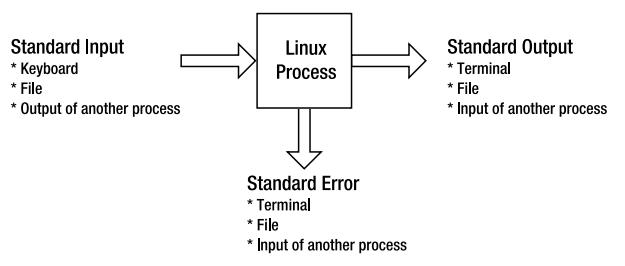
Command Input and Output Redirection Operators


Operation  Bash Shell 
 Redirection Syntax
Read standard input from a file.  command
Read standard input until end of marker.  command <
Write standard output to a file.  command >file
Append standard output to end of file.  command >>file
Write standard output and standard error to separate files.  command >file 2>file2
Write standard output and standard error to the same file.  command >file 2>&1
Write standard output and standard error to the same file.  command &> file
Append standard output and standard error to the end of a file.  command >>file 2>&1
Send (pipe) standard output of first command to input of second command. command | command2
Send (pipe) standard output and standard error to input of second command. command 2>&1 | command2

Monday, July 5, 2010

Identifying Open Ports/Services on Linux

Many tools are available to map open network ports to actual processes and files in
Linux. We will take a look at just one example.

First, we need to look at our listening network ports. We will utilize the ‘-anp –tcp’ flags
to the netstat command to list all processes (-a), don’t map port numbers to friendly name
(-n), list the process ID associated with the network port (-p) and for this example, we
will limit the output to only TCP listeners (--tcp):

[jklemenc]# netstat -anp --tcp
Active Internet connections (servers and established)
Proto Recv-Q Send-Q Local Address           Foreign Address         State      
PID/Program name  
tcp     0      0 0.0.0.0:544             0.0.0.0:*               LISTEN      1826/xinetd        
tcp     0      0 0.0.0.0:3306            0.0.0.0:*               LISTEN      4677/mysqld        
tcp     0      0 0.0.0.0:22              0.0.0.0:*               LISTEN      16446/sshd          
tcp     0      0 0.0.0.0:2105            0.0.0.0:*               LISTEN      1826/xinetd        
tcp     0      0 127.0.0.1:6010          0.0.0.0:*               LISTEN      841/sshd            
tcp     0      0 0.0.0.0:443             0.0.0.0:*               LISTEN      1925/httpd          

In this example, we are interested in the TCP/443 network listener. The output indicates
that httpd is running as process ID 1925 and has TCP/443 open. A quick check using the
‘ps’ command with the PID (-p) parameter to display only the PID returned above along
with a parameter to display the full path of the file (-f):

[jklemenc]# ps -p 1925 -f
UID        PID  PPID  C STIME TTY          TIME CMD
root      1925     1  0  2004 ?        00:03:36 /usr/sbin/httpd

We see from above that /usr/sbin/http is running as PID 1925 as user root.
Related Posts with Thumbnails